Sequence to Sequence: Spanish to English Translation
In this tutorial, we will use EIR for sequence-to-sequence tasks.
Sequence to Sequence (seq-to-seq) models are a type of models that transform an
input sequence into an output sequence,
a task relevant for numerous applications like machine translation,
summarization, and more.
For this tutorial, our task will be translating Spanish sentences into English, using a dataset from Tatoeba.
A - Data
You can download the data for this tutorial here.
After downloading the data, the folder structure should look like this (we will look at the configs in a bit):
eir_tutorials/c_sequence_output/02_sequence_to_sequence
├── conf
│   ├── fusion.yaml
│   ├── globals.yaml
│   ├── input_spanish.yaml
│   └── output.yaml
└── data
    └── eng-spanish
        ├── english.csv
        └── spanish.csv
B - Training
Training follows a similar approach as we saw in the previous tutorial, Sequence Generation: Generating Movie Reviews.
First, we will train on only the English data, without any Spanish data to establish a baseline.
For reference, here are the configurations:
basic_experiment:
  batch_size: 256
  memory_dataset: true
  n_epochs: 10
  output_folder: eir_tutorials/tutorial_runs/c_sequence_output/02_seq_to_seq
  valid_size: 500
evaluation_checkpoint:
  checkpoint_interval: 500
  n_saved_models: 1
  sample_interval: 500
optimization:
  lr: 0.001
  optimizer: adabelief
model_type: "pass-through"
output_info:
  output_source: eir_tutorials/c_sequence_output/02_sequence_to_sequence/data/eng-spanish/english.csv
  output_name: english
  output_type: sequence

output_type_info:
  max_length: 32
  split_on: " "
  sampling_strategy_if_longer: "uniform"
  min_freq: 5

model_config:
  embedding_dim: 128
  model_init_config:
    num_layers: 6

sampling_config:
  generated_sequence_length: 64
  n_eval_inputs: 10
With these configurations, we can train with the following command:
eirtrain \
--global_configs eir_tutorials/c_sequence_output/02_sequence_to_sequence/conf/globals.yaml \
--fusion_configs eir_tutorials/c_sequence_output/02_sequence_to_sequence/conf/fusion.yaml \
--output_configs eir_tutorials/c_sequence_output/02_sequence_to_sequence/conf/output.yaml \
--globals.basic_experiment.output_folder=eir_tutorials/tutorial_runs/c_sequence_output/02_seq_to_seq_eng_only
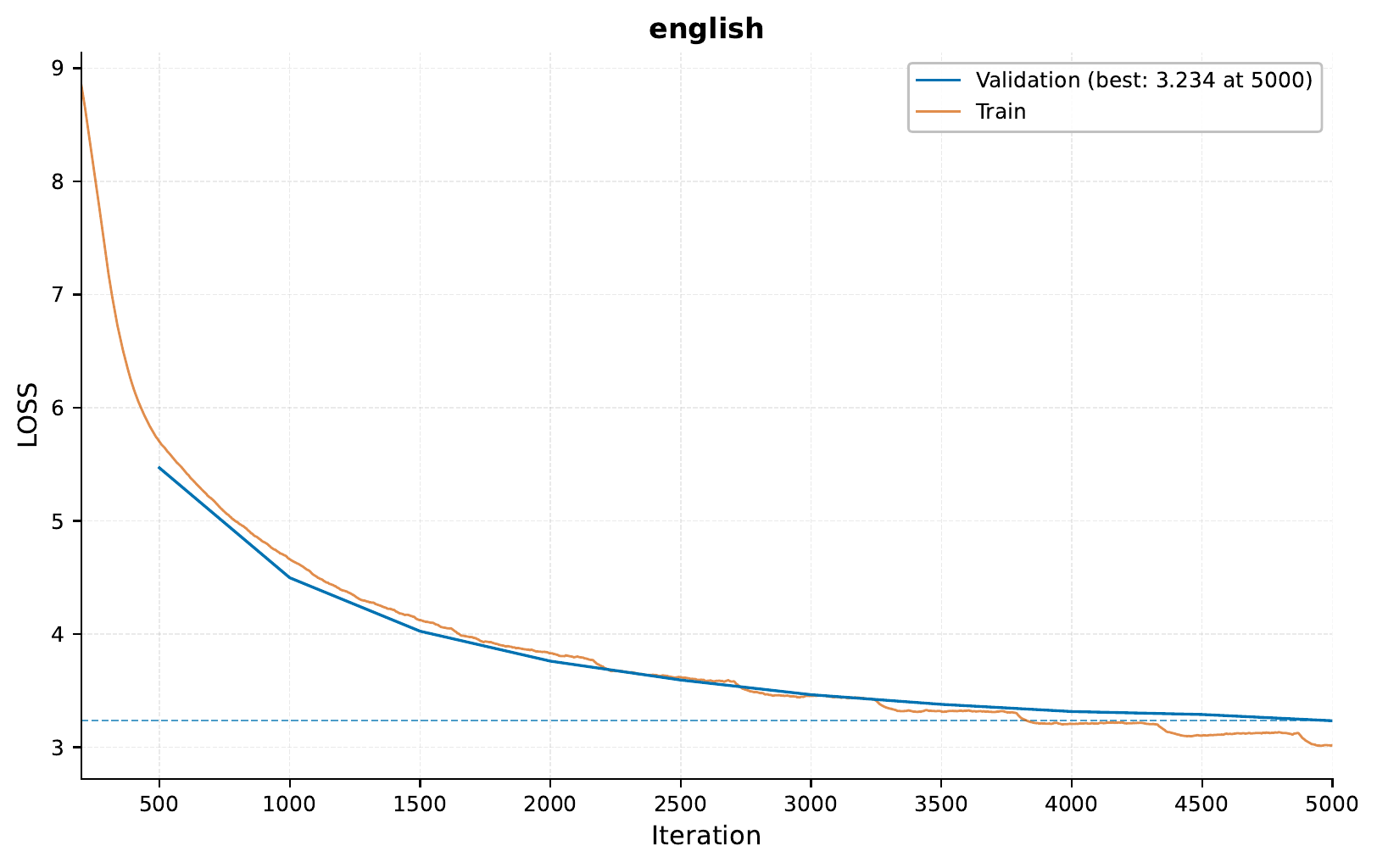
When running the command above, I got the following training curve:
Here are a couple of example of the generated sentences using only English data:
You should be a good teacher.
I was
While the captions above are make some sense, a more interesting task is actually using the Spanish data as input, and generate the respective English translation. For this, we will include an input configuration for the Spanish data:
input_info:
  input_source: eir_tutorials/c_sequence_output/02_sequence_to_sequence/data/eng-spanish/spanish.csv
  input_name: spanish
  input_type: sequence

input_type_info:
  max_length: 32
  split_on: " "
  sampling_strategy_if_longer: "uniform"
  min_freq: 5

model_config:
  embedding_dim: 128
  model_init_config:
    num_layers: 6
To train, we will use the following command:
eirtrain \
--global_configs eir_tutorials/c_sequence_output/02_sequence_to_sequence/conf/globals.yaml \
--input_configs eir_tutorials/c_sequence_output/02_sequence_to_sequence/conf/input_spanish.yaml \
--fusion_configs eir_tutorials/c_sequence_output/02_sequence_to_sequence/conf/fusion.yaml \
--output_configs eir_tutorials/c_sequence_output/02_sequence_to_sequence/conf/output.yaml
When running the command above, I got the following training curve:

We can see that the training curve is better than when we only used English data, indicating that the model can utilize the Spanish data to generate the English sentences.
Now, we can look at some of the generated sentences:
| Spanish | English Translation | |
|---|---|---|
| 0 | Es uno de los libros más de la literatura | It is one of the most interesting books in literature. |
| 1 | Me gustaría perder algo de peso. | I'd like to lose some weight. |
| 2 | Me estoy | I'm getting |
| 3 | El ruido me está volviendo loco. | The noise is driving me crazy. |
| 4 | Yo sé cómo podemos ayudar. | I know how we can help. |
| 5 | ¿De qué están hablando? | What are they talking about? |
| 6 | Díganme cuándo vuelve Tom. | Tell me when Tom will be here? |
| 7 | Tu casa es tres veces más grande que la mía. | Your house is three times as large as mine. |
| 8 | Ya veo por qué no quieres ir ahí. | I can see why you don't want to go there. |
| 9 | Sugiero que te pongas a hacerlo ya mismo. | I suggest you get the same thing right now. |
While these are not perfect translations, they are maybe not too bad considering a simple model trained for around an hour on a laptop.
C - Serving
In this final section, we demonstrate serving our trained model for sequence-to-sequence translation as a web service and interacting with it using HTTP requests.
Starting the Web Service
To serve the model, use the following command:
eirserve --model-path [MODEL_PATH]
Replace [MODEL_PATH] with the actual path to your trained model. This command initiates a web service that listens for incoming requests.
Here is an example of the command:
eirserve \
--model-path eir_tutorials/tutorial_runs/c_sequence_output/02_seq_to_seq/saved_models/02_seq_to_seq_checkpoint_5000_perf-average=-0.1214.pt
Sending Requests
With the server running, we can now send requests for translating text from Spanish to English.
Here’s an example Python function demonstrating this process:
import requests


def send_request(url: str, payload: list[dict]) -> list[dict]:
    response = requests.post(url, json=payload)
    response.raise_for_status()
    return response.json()


payload = [
    {"english": "", "spanish": "Tengo mucho hambre"},
]

response = send_request(url="http://localhost:8000/predict", payload=payload)
print(response)
When running this, we get the following output:
{
    "result": [
        {
            "english": "I'm very hungry hungry."
        }
    ]
}
Additionally, you can send requests using bash:
curl -X POST \
        "http://localhost:8000/predict" \
        -H "accept: application/json" \
        -H "Content-Type: application/json" \
        -d '[{"english": "", "spanish": "Tengo mucho hambre"}]'
When running this, we get the following output:
{
    "result": [
        {
            "english": "I'm very hungry hungry."
        }
    ]
}
Analyzing Responses
After sending requests to the served model, the responses can be analyzed. These responses provide insights into the model’s ability to translate from Spanish to English.
[
    {
        "request": [
            {
                "english": "",
                "spanish": "Tengo mucho hambre"
            },
            {
                "english": "",
                "spanish": "¿Por qué Tomás sigue en Boston?"
            },
            {
                "english": "Why",
                "spanish": "¿Por qué Tomás sigue en Boston?"
            },
            {
                "english": "",
                "spanish": "Un gato muy alto"
            }
        ],
        "response": {
            "result": [
                {
                    "english": "I am very hungry hungry."
                },
                {
                    "english": "Why is Tom still in Boston?"
                },
                {
                    "english": "Why is Tom still in Boston?"
                },
                {
                    "english": "A loud cat"
                }
            ]
        }
    }
]
Thanks for reading!