Streaming Data Hands-On Guide
This guide covers EIR’s streaming data functionality, which allows for real-time data streaming during training. The guide focuses on how to implement a compatible WebSocket server that can stream data to EIR.
Overview
EIR includes built-in support for receiving streaming data via WebSocket connections. To use this functionality, you only need to:
Implement a WebSocket server that follows EIR’s protocol specification
Point to your server’s WebSocket address in EIR’s configuration files
For example, to use streaming data in EIR, you would simply specify the WebSocket URL in your configuration:
output_info:
  output_source: ws://localhost:8000/ws
  output_name: text_output
  output_type: sequence
EIR will automatically handle the connection, data receiving, and processing.
Protocol Specification
To be compatible with EIR, your WebSocket server must implement the following protocol:
Message Structure
All messages use JSON format:
{
    "type": str,    # Message type
    "payload": Any  # Message payload
}
Servers and the EIR client
Before going further, it’s useful to further define some terminology:
- Client (EIR): The EIR client that connects to the server and processes the streamed data.
This is built into EIR and not modified by you.
- Server: The WebSocket server that streams data to EIR.
This is what you implement and customize.
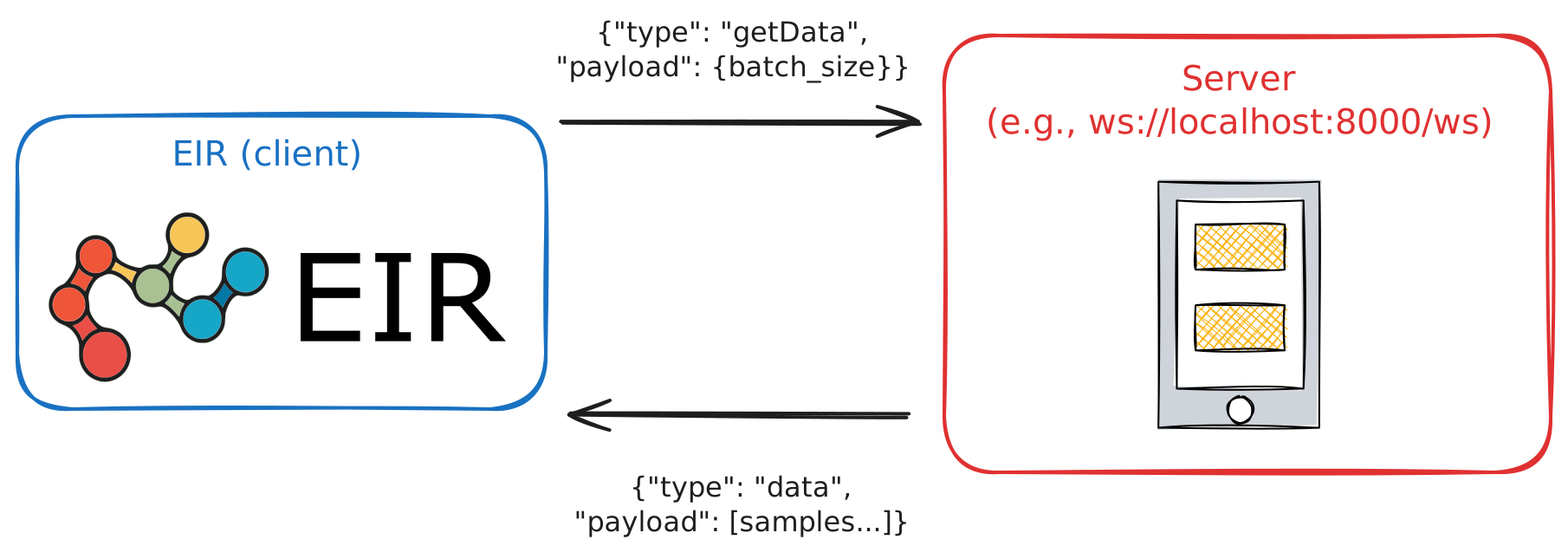
So, while EIR handles the client side, we have to make sure our server implements the correct protocol to communicate with EIR.
Core Protocol Messages
Your server should be prepared to handle several message types from the EIR client. At a high level, these are the key interactions:
- Handshake & Keep-Alive:
handshake: The very first message sent by the client to establish a compatible connection. Your server must respond in kind.heartbeat: A simple message to keep the connection alive and check for responsiveness.
- Data & Schema Exchange:
getInfo: The client asks for the structure of your data (e.g., input/output names and types). Your server replies with aninfomessage.getData: The client requests a batch of data samples. Your server replies with adatamessage containing the samples.
- State Management:
status: The client can ask for the current state of your data stream (e.g., how many samples have been sent).reset: The client can instruct the server to reset its data stream to the beginning. This is crucial for allowing EIR to read the stream multiple times (e.g., once for setup and once for training).
Logic Flow When Streaming
When we run eirtrain where one of the input/output sources is a WebSocket URL,
we can roughly split the process into 3 main phases.
Phase 1: Handshake and Setup
First is the setup phase, where the EIR client connects to your WebSocket server and checks that it can communicate properly.
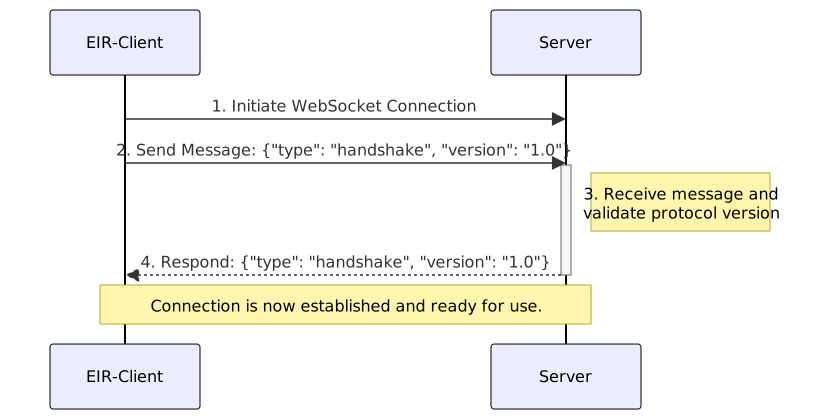
Below is an example of the connection logic for phase 1 that we can implement in our server.
 1async def connect_websocket(websocket: WebSocket) -> bool:
 2    try:
 3        # P1 Step 1: Accept the WebSocket connection from the EIR-client.
 4        await websocket.accept()
 5        # P1 Step 2: Receive the handshake message from the EIR-client.
 6        handshake_message = await websocket.receive_json()
 7
 8        # P1 Step 3: Validate the handshake message.
 9        if (
10            handshake_message["type"] != "handshake"
11            or handshake_message["version"] != PROTOCOL_VERSION
12        ):
13            await websocket.send_json(
14                {
15                    "type": "error",
16                    "payload": {"message": "Incompatible protocol version"},
17                }
18            )
19            await websocket.close()
20            return False
21
22        # P1 Step 4: Send a handshake response back to the EIR-client.
23        await websocket.send_json({"type": "handshake", "version": PROTOCOL_VERSION})
24        return True
25
26    except Exception as e:
27        logger.error(f"Error in connect: {e}")
28        return False
29
30
Phase 2: Data Setup
Here, the EIR client requests information about the data structure
from the server. After that, EIR will request samples of data
until the streaming_setup_samples under data_preparation in the
global configuration file is reached.
These samples are saved locally in the experiment directory during the experiment run phase, and should be deleted after the experiment is complete.
The reason for this is twofold:
Training Data Statistics EIR uses these samples to gather and compute various statistics about the potentially raw training data to use for training. For example:
The mean and standard deviation of image pixel values for normalization.
The vocabulary of text data for tokenization.
The unique values in categorical data for encoding.
… and so on.
Validation Data Setup EIR also uses these samples to set up the validation data.
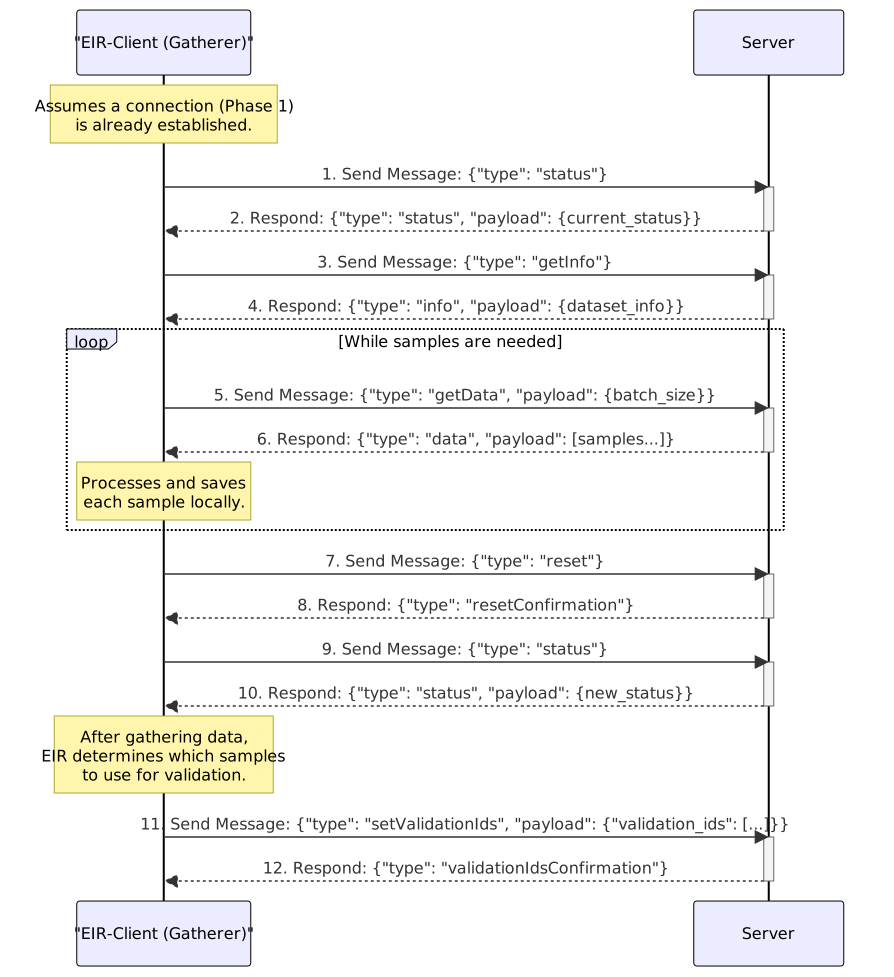
Below is an example of the FastAPI websocket endpoint including the logic for handling phase 2 messages.
  1@app.websocket("/ws")
  2async def websocket_endpoint(websocket: WebSocket):
  3    # P1 Steps 1-4: Establish WebSocket connection and perform handshake.
  4    connected = await connect_websocket(websocket=websocket)
  5    if not connected:
  6        return
  7
  8    try:
  9        while True:
 10            data = await websocket.receive_json()
 11            message_type = data.get("type")
 12
 13            # P2 Steps 1-2 & 9-10: Client (Gatherer) requests server status before
 14            # and after data gathering.
 15            if message_type == "status":
 16                await websocket.send_json(
 17                    {"type": "status", "payload": simulator.get_status()}
 18                )
 19
 20            # P2 Steps 3-4: Client (Gatherer) requests the dataset schema.
 21            # NOTE: This is specific to the dataset
 22            elif message_type == "getInfo":
 23                dataset_info = DatasetInfo(
 24                    inputs={
 25                        "text_input": InputInfo(
 26                            type="sequence",
 27                        )
 28                    },
 29                    outputs={"text_output": OutputInfo(type="sequence")},
 30                )
 31                await websocket.send_json(
 32                    {"type": "info", "payload": dataset_info.model_dump()}
 33                )
 34
 35            # P2, Steps 5-6: The Client (Gatherer) requests data, and the server
 36            # responds.
 37            # AND
 38            # P3, Steps 1-2: The Client (Trainer) requests data, and the server
 39            # responds.
 40            # Note: The server logic is identical for both phases.
 41            elif message_type == "getData":
 42                batch_size = data.get("payload", {}).get("batch_size", 32)
 43                batch = simulator.get_batch(batch_size=batch_size)
 44
 45                if not batch:
 46                    await websocket.send_json(
 47                        {"type": "data", "payload": ["terminate"]}
 48                    )
 49                    break
 50
 51                await websocket.send_json({"type": "data", "payload": batch})
 52
 53            # P2 Steps 7-8: Client (Gatherer) requests to reset the server state
 54            # after gathering data.
 55            # This handles a reset command by performing two distinct actions
 56            # to support multi-client environments.
 57            # 1. A private 'resetConfirmation' is sent directly to the client
 58            #    that initiated the request, acknowledging their command was successful.
 59            # 2. A public 'reset' message is broadcast to all connected clients
 60            #    to notify them of the state change, ensuring synchronization.
 61            elif message_type == "reset":
 62                simulator.reset()
 63                await websocket.send_json(
 64                    {
 65                        "type": "resetConfirmation",
 66                        "payload": {"message": "Reset successful"},
 67                    }
 68                )
 69                await websocket.send_json(
 70                    {"type": "reset", "payload": {"message": "Reset command received"}}
 71                )
 72
 73            # --- Ancillary Commands ---
 74
 75            elif message_type == "setValidationIds":
 76                validation_ids = data.get("payload", {}).get("validation_ids", [])
 77                validation_ids = set(validation_ids)
 78
 79                await websocket.send_json(
 80                    {
 81                        "type": "validationIdsConfirmation",
 82                        "payload": {
 83                            "message": f"Received {len(validation_ids)} validation IDs"
 84                        },
 85                    }
 86                )
 87
 88            elif message_type == "heartbeat":
 89                await websocket.send_json({"type": "heartbeat"})
 90
 91            else:
 92                logger.warning(f"Unknown message type: {message_type}")
 93                await websocket.send_json(
 94                    {
 95                        "type": "error",
 96                        "payload": {"message": f"Unknown message type: {message_type}"},
 97                    }
 98                )
 99
100    except WebSocketDisconnect:
101        print("WebSocket disconnected")
102        raise
103    finally:
104        try:
105            await websocket.close()
106        except Exception as e:
107            logger.error(f"Error closing WebSocket: {e}")
108        logger.info("WebSocket connection closed")
109        simulator.reset()
110
111
Phase 3: Training Data Streaming
Finally, we reach the training phase, where the EIR client requests data samples for training. This is really nothing too new after setting up the data structure in phase 2, now we just need to keep sending data samples to EIR for training.
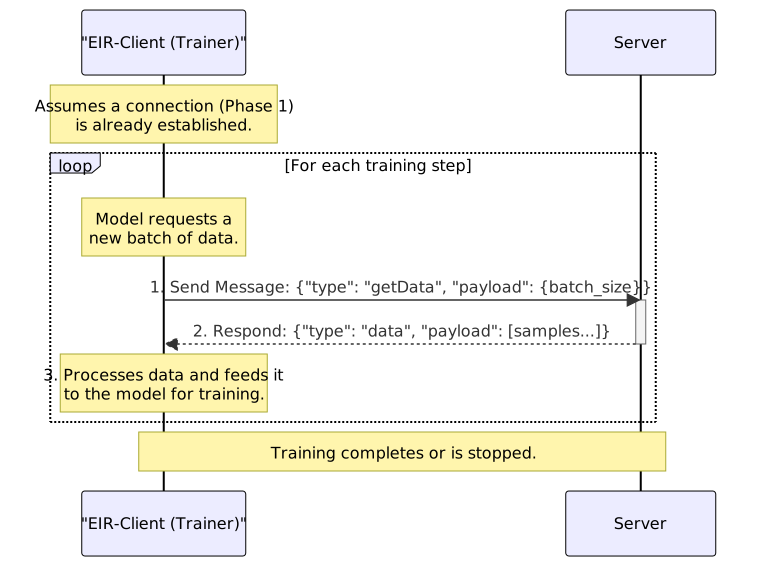
Putting it All Together
Now that we have the basic logic for each phase, let’s put it all together for a toy example where we train a seq-to-seq model on a simple, simulated dataset.
Setting up a WebSocket server
We will implement our streaming logic in the following files:
single_sample_simulation.py: Contains the logic for generating a single sample of data, containing both the input and output sequences for the seq-to-seq model.data_simulator.py: Contains the logic for generating a batch of data samples, resetting the data stream, and keeping track of the current sample index.simulation_streamer.py: The main WebSocket server implementation, reads data from the simulator and handles the WebSocket connection with EIR.
Here are the three files in their entirety:
import random


def simulate_health_sample(sequence_length: int) -> tuple[str, str]:
    age = random.randint(18, 80)
    fitness_score = round(random.uniform(1.0, 10.0), 1)

    cortisol_morning = random.randint(10, 25)
    cortisol_evening = random.randint(3, 12)
    sleep_quality = random.randint(1, 10)

    start_hour = random.randint(6, 10)
    start_minute = random.choice([0, 15, 30, 45])

    activity_level = random.choice(["sedentary", "light", "moderate", "vigorous"])

    input_sequence = (
        f"<START> "
        f"|Time of HR monitoring start: {start_hour:02d}:{start_minute:02d}| "
        f"|Biomarkers| "
        f"Cortisol_Morning: {cortisol_morning} - "
        f"Cortisol_Evening: {cortisol_evening} - "
        f"Sleep_Quality: {sleep_quality} - "
        f"|Demographics| "
        f"Age: {age} - "
        f"Fitness_Score: {fitness_score} - "
        f"Activity: {activity_level} -"
    )

    hr_values = []

    base_hr = 70

    if age > 60:
        base_hr += random.randint(5, 15)
    elif age < 30:
        base_hr -= random.randint(0, 10)

    if fitness_score > 7:
        base_hr -= random.randint(10, 20)
    elif fitness_score < 4:
        base_hr += random.randint(8, 18)

    activity_modifier = {
        "vigorous": random.randint(20, 40),
        "moderate": random.randint(10, 25),
        "light": random.randint(0, 10),
        "sedentary": random.randint(-5, 5),
    }[activity_level]

    base_hr += activity_modifier

    if cortisol_morning > 20:
        base_hr += random.randint(5, 12)

    if sleep_quality < 4:
        base_hr += random.randint(3, 8)

    current_hr = max(50, min(180, base_hr + random.randint(-8, 8)))

    for i in range(sequence_length):
        change = random.randint(-5, 8)

        time_of_day = (start_hour + (i * 5 / 60)) % 24

        if 6 <= time_of_day <= 9:
            change += random.randint(3, 12)
        elif 12 <= time_of_day <= 14:
            change += random.randint(2, 8)
        elif time_of_day >= 22 or time_of_day <= 5:
            change -= random.randint(5, 15)

        if activity_level == "vigorous" and 16 <= time_of_day <= 20:
            change += random.randint(8, 20)

        current_hr += change
        current_hr = max(45, min(200, current_hr))

        binned_hr = int(current_hr / 2) * 2
        hr_values.append(str(binned_hr))

    hr_sequence = " ".join(hr_values)

    return input_sequence, hr_sequence
import os
from typing import Any

from docs.doc_modules.user_guides.single_sample_simulation import simulate_health_sample
from eir.utils.logging import get_logger

logger = get_logger(__name__)


class DataSimulator:
    def __init__(
        self,
        sequence_length: int = 64,
        max_iterations: int | None = None,
    ):
        self.sequence_length = sequence_length
        self.max_iterations = max_iterations
        self.position = 0

        logger.info(f"Using sequence_length={self.sequence_length}")
        if self.max_iterations is not None:
            logger.info(f"Will terminate after {self.max_iterations} iterations")

    def reset(self):
        self.position = 0
        if self.max_iterations is not None:
            logger.info(f"Reset: Will terminate after {self.max_iterations} iterations")

    def get_batch(self, batch_size: int) -> list[dict[str, Any]]:
        if self.max_iterations is not None and self.position >= self.max_iterations:
            logger.info(f"Reached max iterations ({self.max_iterations}), terminating")
            return []

        batch = []
        for _ in range(batch_size):
            if self.max_iterations is not None and self.position >= self.max_iterations:
                break

            text_input, text_sequence = simulate_health_sample(sequence_length=64)
            sample_id = f"sample_{self.position}"

            batch.append(
                {
                    "inputs": {
                        "text_output": text_sequence,
                        "text_input": text_input,
                    },
                    "target_labels": {"text_output": {"text_output": text_sequence}},
                    "sample_id": sample_id,
                }
            )

            self.position += 1

        return batch

    def get_status(self) -> dict[str, Any]:
        status_data = {
            "current_position": self.position,
        }

        if self.max_iterations is not None:
            status_data["max_iterations"] = self.max_iterations
            status_data["remaining_iterations"] = max(
                0, self.max_iterations - self.position
            )

        return status_data


def create_simulator() -> DataSimulator:
    sequence_length = int(os.getenv("SEQUENCE_LENGTH", "512"))

    max_iterations_str = os.getenv("MAX_ITERATIONS")
    max_iterations = int(max_iterations_str) if max_iterations_str else None

    logger.info(
        f"Creating DataSimulator with sequence_length={sequence_length}, "
        f"max_iterations={max_iterations}"
    )

    return DataSimulator(
        sequence_length=sequence_length,
        max_iterations=max_iterations,
    )
import argparse
import os

from fastapi import FastAPI, WebSocket, WebSocketDisconnect
from pydantic import BaseModel

from docs.doc_modules.user_guides.data_simulator import create_simulator
from eir.setup.streaming_data_setup.protocol import PROTOCOL_VERSION
from eir.utils.logging import get_logger

logger = get_logger(name=__name__)

app = FastAPI()
simulator = create_simulator()


class InputInfo(BaseModel):
    type: str
    shape: list[int] | None = None


class OutputInfo(BaseModel):
    type: str
    shape: list[int] | None = None


class DatasetInfo(BaseModel):
    inputs: dict[str, InputInfo]
    outputs: dict[str, OutputInfo]


# start-connect-websocket
async def connect_websocket(websocket: WebSocket) -> bool:
    try:
        # P1 Step 1: Accept the WebSocket connection from the EIR-client.
        await websocket.accept()
        # P1 Step 2: Receive the handshake message from the EIR-client.
        handshake_message = await websocket.receive_json()

        # P1 Step 3: Validate the handshake message.
        if (
            handshake_message["type"] != "handshake"
            or handshake_message["version"] != PROTOCOL_VERSION
        ):
            await websocket.send_json(
                {
                    "type": "error",
                    "payload": {"message": "Incompatible protocol version"},
                }
            )
            await websocket.close()
            return False

        # P1 Step 4: Send a handshake response back to the EIR-client.
        await websocket.send_json({"type": "handshake", "version": PROTOCOL_VERSION})
        return True

    except Exception as e:
        logger.error(f"Error in connect: {e}")
        return False


# end-connect-websocket


# start-websocket-endpoint
@app.websocket("/ws")
async def websocket_endpoint(websocket: WebSocket):
    # P1 Steps 1-4: Establish WebSocket connection and perform handshake.
    connected = await connect_websocket(websocket=websocket)
    if not connected:
        return

    try:
        while True:
            data = await websocket.receive_json()
            message_type = data.get("type")

            # P2 Steps 1-2 & 9-10: Client (Gatherer) requests server status before
            # and after data gathering.
            if message_type == "status":
                await websocket.send_json(
                    {"type": "status", "payload": simulator.get_status()}
                )

            # P2 Steps 3-4: Client (Gatherer) requests the dataset schema.
            # NOTE: This is specific to the dataset
            elif message_type == "getInfo":
                dataset_info = DatasetInfo(
                    inputs={
                        "text_input": InputInfo(
                            type="sequence",
                        )
                    },
                    outputs={"text_output": OutputInfo(type="sequence")},
                )
                await websocket.send_json(
                    {"type": "info", "payload": dataset_info.model_dump()}
                )

            # P2, Steps 5-6: The Client (Gatherer) requests data, and the server
            # responds.
            # AND
            # P3, Steps 1-2: The Client (Trainer) requests data, and the server
            # responds.
            # Note: The server logic is identical for both phases.
            elif message_type == "getData":
                batch_size = data.get("payload", {}).get("batch_size", 32)
                batch = simulator.get_batch(batch_size=batch_size)

                if not batch:
                    await websocket.send_json(
                        {"type": "data", "payload": ["terminate"]}
                    )
                    break

                await websocket.send_json({"type": "data", "payload": batch})

            # P2 Steps 7-8: Client (Gatherer) requests to reset the server state
            # after gathering data.
            # This handles a reset command by performing two distinct actions
            # to support multi-client environments.
            # 1. A private 'resetConfirmation' is sent directly to the client
            #    that initiated the request, acknowledging their command was successful.
            # 2. A public 'reset' message is broadcast to all connected clients
            #    to notify them of the state change, ensuring synchronization.
            elif message_type == "reset":
                simulator.reset()
                await websocket.send_json(
                    {
                        "type": "resetConfirmation",
                        "payload": {"message": "Reset successful"},
                    }
                )
                await websocket.send_json(
                    {"type": "reset", "payload": {"message": "Reset command received"}}
                )

            # --- Ancillary Commands ---

            elif message_type == "setValidationIds":
                validation_ids = data.get("payload", {}).get("validation_ids", [])
                validation_ids = set(validation_ids)

                await websocket.send_json(
                    {
                        "type": "validationIdsConfirmation",
                        "payload": {
                            "message": f"Received {len(validation_ids)} validation IDs"
                        },
                    }
                )

            elif message_type == "heartbeat":
                await websocket.send_json({"type": "heartbeat"})

            else:
                logger.warning(f"Unknown message type: {message_type}")
                await websocket.send_json(
                    {
                        "type": "error",
                        "payload": {"message": f"Unknown message type: {message_type}"},
                    }
                )

    except WebSocketDisconnect:
        print("WebSocket disconnected")
        raise
    finally:
        try:
            await websocket.close()
        except Exception as e:
            logger.error(f"Error closing WebSocket: {e}")
        logger.info("WebSocket connection closed")
        simulator.reset()


# end-websocket-endpoint


def main():
    parser = argparse.ArgumentParser(description="Run the data streaming server")
    parser.add_argument(
        "--host", type=str, default="0.0.0.0", help="Host to run the server on"
    )
    parser.add_argument(
        "--port", type=int, default=8000, help="Port to run the server on"
    )
    parser.add_argument(
        "--max-iterations",
        type=int,
        default=None,
        help="Maximum number of iterations before terminating",
    )

    args = parser.parse_args()

    if args.max_iterations is not None:
        os.environ["MAX_ITERATIONS"] = str(args.max_iterations)

    import uvicorn

    uvicorn.run(app, host=args.host, port=args.port, ws_ping_timeout=3600)


if __name__ == "__main__":
    main()
Assuming we have these files in the same directory,
we can run the WebSocket server with python simulation_streamer.py
or python -m simulation_streamer. This will start the server
on ws://localhost:8000/ws by default.
Training with EIR
Here’s the folder structure we’ll be working with:
eir_tutorials/user_guides/01_streaming_data
├── fusion.yaml
├── globals.yaml
├── input.yaml
└── output.yaml
Let’s look at our configurations. The global config specifies basic training parameters:
basic_experiment:
  batch_size: 32
  memory_dataset: true
  n_epochs: 100
  output_folder: eir_tutorials/tutorial_runs/user_guides/01_streaming
  valid_size: 500
  dataloader_workers: 0
data_preparation:
  streaming_setup_samples: 1000
evaluation_checkpoint:
  checkpoint_interval: 500
  n_saved_models: 1
  sample_interval: 500
visualization_logging:
  plot_skip_steps: 500
For the input configuration, we are using the simulated input sequence in our data simulator. Notice how we are pointing to the WebSocket server as the input source:
input_info:
  input_source: ws://localhost:8000/ws
  input_name: text_input
  input_type: sequence

input_type_info:
  max_length: 64
  split_on: null
  tokenizer: "bpe"
  adaptive_tokenizer_max_vocab_size: 512
  sampling_strategy_if_longer: "uniform"
  min_freq: 1

model_config:
  embedding_dim: 64
  model_init_config:
    num_layers: 2
For fusion, we use a simple pass-through configuration since we’re only doing sequence generation:
model_type: "pass-through"
Just like the input configuration, the output configuration specifies our WebSocket server as the output source:
output_info:
  output_source: ws://localhost:8000/ws
  output_name: text_output
  output_type: sequence

output_type_info:
  max_length: 64
  split_on: null
  tokenizer: "bpe"
  adaptive_tokenizer_max_vocab_size: 512
  sampling_strategy_if_longer: "uniform"
  min_freq: 1

model_config:
  embedding_dim: 64
  model_init_config:
    num_layers: 2

sampling_config:
  generated_sequence_length: 64
  n_eval_inputs: 3
Note the output_source pointing to our WebSocket server. This tells EIR
to expect streaming data from this address.
As mentioned earlier, before starting training, we need to ensure our streaming server is running.
Once it’s running, in another terminal, we can start training:
eirtrain \
--global_configs eir_tutorials/user_guides/01_streaming_data/globals.yaml \
--input_configs eir_tutorials/user_guides/01_streaming_data/input.yaml \
--fusion_configs eir_tutorials/user_guides/01_streaming_data/fusion.yaml \
--output_configs eir_tutorials/user_guides/01_streaming_data/output.yaml
During training, EIR will connect to the streaming server and receive data in batches. Let’s look at some samples generated during training.
At iteration 500:
64 198 19
At iteration 2500:
88 98 100 100 98 94 96 96 98 104 110 106 102 102 108 114 116 116 122 124 132 136 140 140 140 138 138 146 154 162 174 186 198 200 200 200 200 200 200 200 200 198 200 200 200 200 200 200 200 200 200 200 200 200 200 200 200 200 200 200
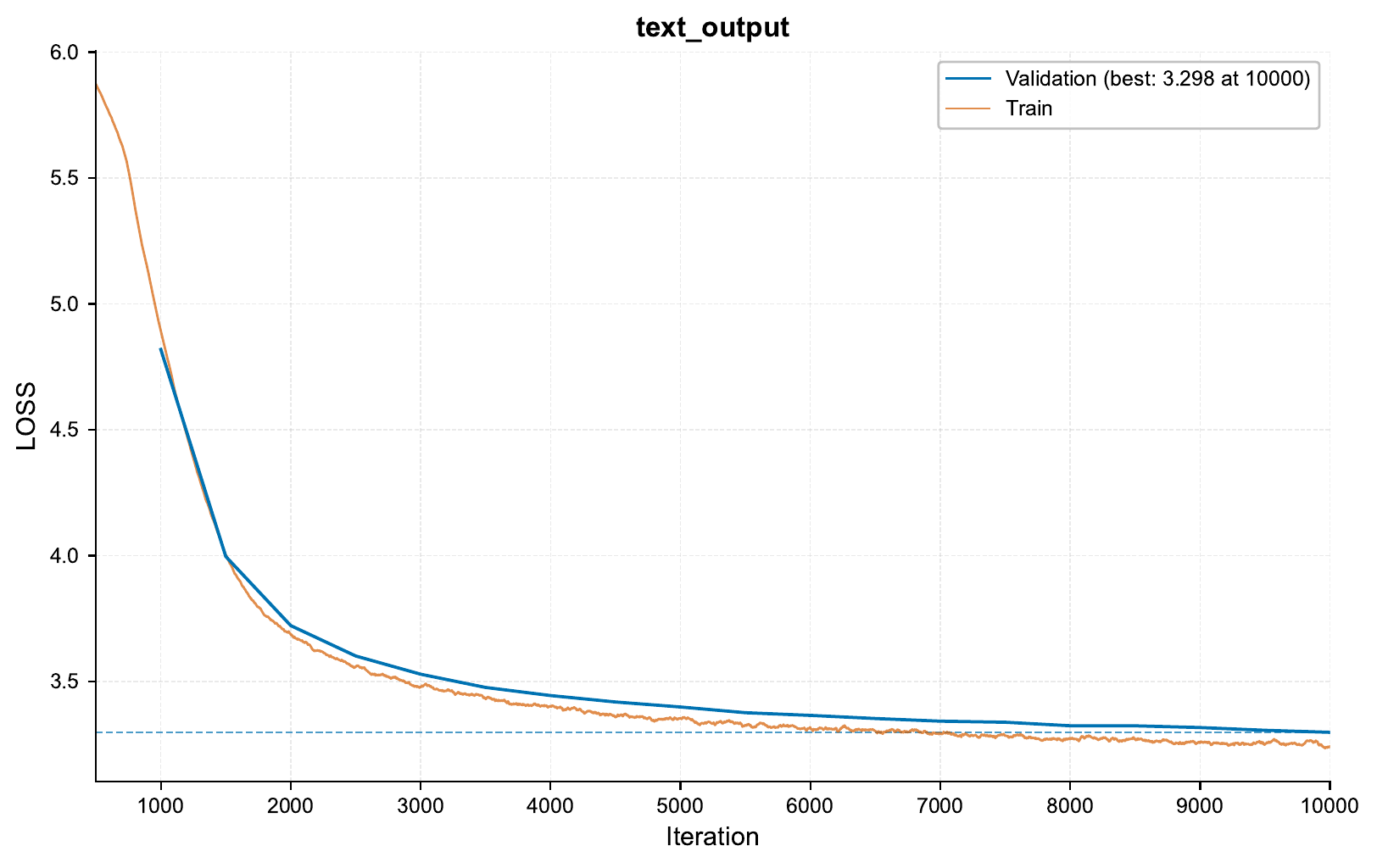
Here’s the training curve showing our progress:
The nice thing here is that once we have the major pieces in place for streaming data, it is easier to adapt this to a different logic within the current experiment (e.g. changing the data generation logic), or apply this to different datasets.