Genomics Guide
Ready-to-use configurations for genetic data analysis using the Genome Local Network (GLN) model.
Data format: NumPy arrays + .bim variant files (from PLINK processing)
Model: GLN - specifically designed for large-scale genomics data
Note
First step: Copy the Configuration Guides global configuration as your globals.yaml
Quick Start
Use case: Genomic prediction (for example T2D disease risk, or continuous traits like blood metabolites) from SNP data
Data requirements: Individual-level genotype data, phenotype labels
Files needed:
input_info:
  input_source: data/genotype_arrays/       # Path to your .npy genotype files
  input_name: genotype
  input_type: omics

input_type_info:
  snp_file: data/variants.bim               # PLINK .bim file with variant information

model_config:
  model_type: genome-local-net              # GLN model designed for genomics
Note
The input_source should contain NumPy arrays of shape (3, n_SNPs),
where each SNP is represented by 3 values (one-hot encoded). Missing
genotypes are represented as all-zeros across the 3 channels. You can
convert your .bed/.bim/.fam files to EIR format using the
plink pipelines tool.
output_info:
  output_name: disease_risk
  output_source: data/phenotypes.csv       # Must contain "ID" column + target
  output_type: tabular

# Note: You don't have to include both ``target_cat_columns``
# and ``target_con_columns``, but you can if you have both and multiple
# targets in both categories if you want.
output_type_info:
  target_cat_columns:
    - Disease_Status                        # Categorical target column
  target_con_columns:
    - BMI                                   # Continuous target column (optional)
Run command:
eirtrain --global_configs globals.yaml \
         --input_configs inputs.yaml \
         --output_configs outputs.yaml
About the GLN Model
Full model configuration with all available parameters:
model_config:
  model_type: genome-local-net
  model_init_config:
    # Architecture control
    layers: null                          # Auto-determine layers based on cutoff
    cutoff: 1024                          # Feature dimension where auto setup stops
    direction: "down"                     # "down" (compress) or "up" (expand)

    # Kernel configuration
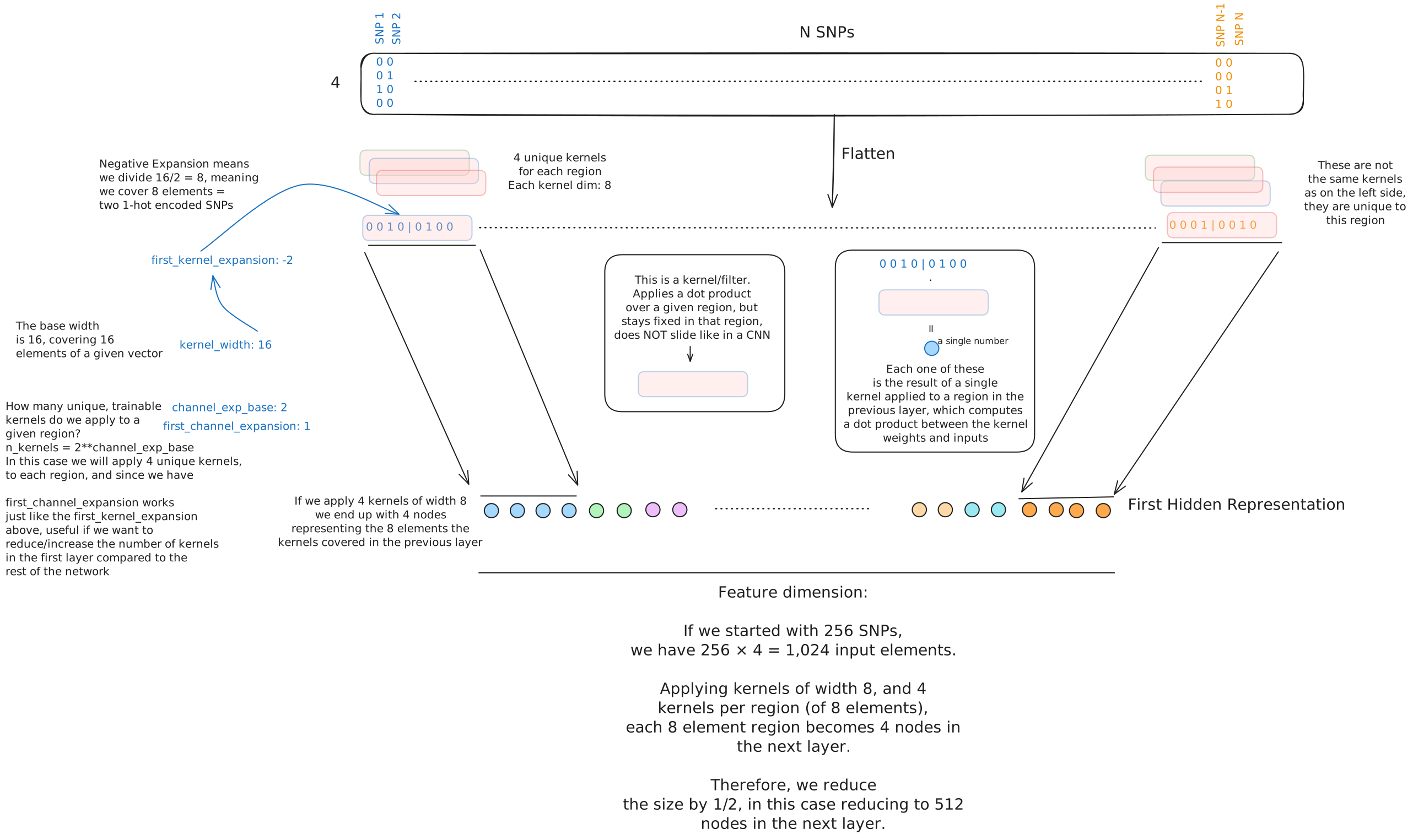
    kernel_width: 12                      # Width of locally connected kernels (4 SNPs × 3 channels)
    first_kernel_expansion: -2            # Shrink first kernel (negative = divide, positive = multiply)
    num_lcl_chunks: null                  # Alternative: split input into N chunks

    # Kernel/feature configuration
    channel_exp_base: 2                   # Power of 2 for number of channels/weights applied to each local patch (2^2 = 4 channels)
    first_channel_expansion: 1            # Channel multiplier for first layer

    # Regularization
    rb_do: 0.10                          # Dropout in residual blocks
    stochastic_depth_p: 0.00             # Probability of dropping entire layers
    l1: 0.00                             # L1 regularization on first layer

    # Advanced features
    attention_inclusion_cutoff: null      # Add attention when feature length > cutoff
Feel free to click on the figure below to see more information about the GLN model architecture and how the different parameters above affect it:
Next section title
Large-Scale Cohorts (UK Biobank Scale)
Use case: Analysis on 100K+ samples with 500K+ variants Challenge: Optimal parameter selection becomes more important at this scale
For large-scale genomics, parameter tuning more dataset-dependent. That’s one of the reason we created the EIR-auto-GP project, which performs automated parameter selection based data characteristics:
Automated parameter selection examples:
Learning rate scales with SNP count: 1e-3 (< 1K SNPs) → 1e-5 (> 2M SNPs)
GLN kernel expansion adapts to data size: -4 (small) → +8 (larger datasets)
Memory management automatically detects available RAM and dataset size
Batch size & validation dynamically sized based on sample count
Early stopping buffer scales with iterations per epoch
Manual Parameter Selection Guide
If configuring manually, these are some of the criteria we found useful (and are implemented in EIR-auto-GP):
Learning Rate Selection:
# < 1,000 SNPs
optimization:
  lr: 0.001

# 1K - 10K SNPs
optimization:
  lr: 0.0005

# 10K - 100K SNPs
optimization:
  lr: 0.0002

# 100K - 500K SNPs
optimization:
  lr: 0.0001

# 500K - 2M SNPs
optimization:
  lr: 0.00005

# > 2M SNPs
optimization:
  lr: 0.00001
GLN Kernel Parameters:
# < 1K SNPs: Smaller kernels for limited data
model_init_config:
  kernel_width: 12
  first_kernel_expansion: -4    # 16/4 = 4 (covers 1 SNP)

# 1K - 10K SNPs
model_init_config:
  kernel_width: 12
  first_kernel_expansion: -2    # 16/2 = 8 (covers 2 SNPs)

# 10K - 100K SNPs
model_init_config:
  kernel_width: 12
  first_kernel_expansion: 1     # 16*1 = 16 (covers 4 SNPs)

# 100K - 500K SNPs
model_init_config:
  kernel_width: 12
  first_kernel_expansion: 2     # 16*2 = 32 (covers 8 SNPs)

# > 500K SNPs: Higher context to reduce feature size more aggressively
model_init_config:
  kernel_width: 12
  first_kernel_expansion: 4     # 16*4 = 64 (covers 16 SNPs)
Memory and Performance:
basic_experiment:
  # Memory dataset decision: dataset_size < 60% of available RAM
  # Formula: (n_snps × n_samples × 4 bytes) < (0.6 × RAM)
  memory_dataset: false          # Use for large datasets

  # Batch size: balance memory usage with training stability
  batch_size: 64                 # Standard for most genomics datasets
  batch_size: 32                 # Reduce if GPU memory limited

  # Workers: scale with CPU cores and memory usage
  dataloader_workers: 8          # ~80% of available cores for disk loading
  dataloader_workers: 0          # Use when memory_dataset: true

training_control:
  # Early stopping buffer: min(5000, iterations_per_epoch × 5)
  early_stopping_buffer: 2000    # Large datasets need more burn-in time

  # Sample interval: min(1000, iterations_per_epoch)
  sample_interval: 1000          # Less frequent evaluation for efficiency
Complete large-scale configuration:
basic_experiment:
  output_folder: "results/ukb_analysis"
  n_epochs: 50
  batch_size: 64
  memory_dataset: false
  dataloader_workers: 8

optimization:
  lr: 0.0001                    # For 100K-500K SNPs

training_control:
  early_stopping_patience: 15
  early_stopping_buffer: 2000

attribution_analysis:
  compute_attributions: true
  max_attributions_per_class: 1024
input_info:
  input_source: data/ukb_genotypes/
  input_name: genotype
  input_type: omics

input_type_info:
  snp_file: data/ukb_variants.bim

model_config:
  model_type: genome-local-net
  model_init_config:
    kernel_width: 12
    first_kernel_expansion: 2     # For 100K-500K SNPs
Note
Recommended approach: Use EIR-auto-GP for automatic parameter optimization on large-scale data. It handles the complexity of parameter selection based on your specific dataset characteristics.